It seems obvious to say, but if you leave Silicon Valley and go out into the rest of the world and tell them, “there are these things called agents, which are pretty smart, and can do tasks with you, and automate some of the repetitive parts of your work”, chances are the first question you’ll get back is, “Can they use a computer?”
This is a good question! Can they, really? The long horizon of productivity potential, out in the real economy we’re going to go unlock over decades, runs through pretty everyday work: can an agent sit (metaphorically) at a desk 24/7, and be trusted to use a web browser, fill out forms, click the right buttons, and not make mistakes? This is the domain of Business Process Outsourcing (BPO), which historically meant, “can this work be outsourced?” but now has a new agentic frontier. We wrote about this last year, when the computer-use landscape was still mostly a bunch of demos. A lot has happened since then.
The models have improved faster than almost anyone expected. Computer-using agents are beginning to hold up in production at scale and on narrow, repeatable workflows: updating systems of record, moving data through portals, processing tickets, checking records, and handling the long tail of software where no clean API exists. With the right infrastructure, computer-use capabilities can now be deployed to tackle end-to-end tasks at scale, which before required either human supervision or direct human completion.
Today, workflows leveraging computer-use are far from perfect: agents are brittle when work drifts off the runbook, and for certain use-cases where caching is intractable (more below) they are expensive enough that the math does not work everywhere. But we’re seeing production deployments for standardized back-office work, especially where labor would otherwise be clicking through legacy systems by hand; the cost curve is starting to look compelling, considering that workflows leveraging computer-use offer structural advantages such as 24/7 availability and – most importantly – scalability to meet demand.
The first wave of computer-use infrastructure was about making agents capable: seeing, clicking, typing, recovering from mistakes. The next wave is about making them useful inside actual companies. As raw UI navigation becomes a model-layer commodity, the model is no longer the main bottleneck and the durable advantage moves up the stack: context, permissions, process knowledge, validation, escalation, error handling, caching, and the hard-earned understanding of how work actually gets done inside one specific customer’s organization to map a workflow end-to-end. In other words, the frontier is shifting from “can the agent use a computer?” to “can it reliably do this job?”
From Humans Watching Every Step to Real Autonomous Workflows
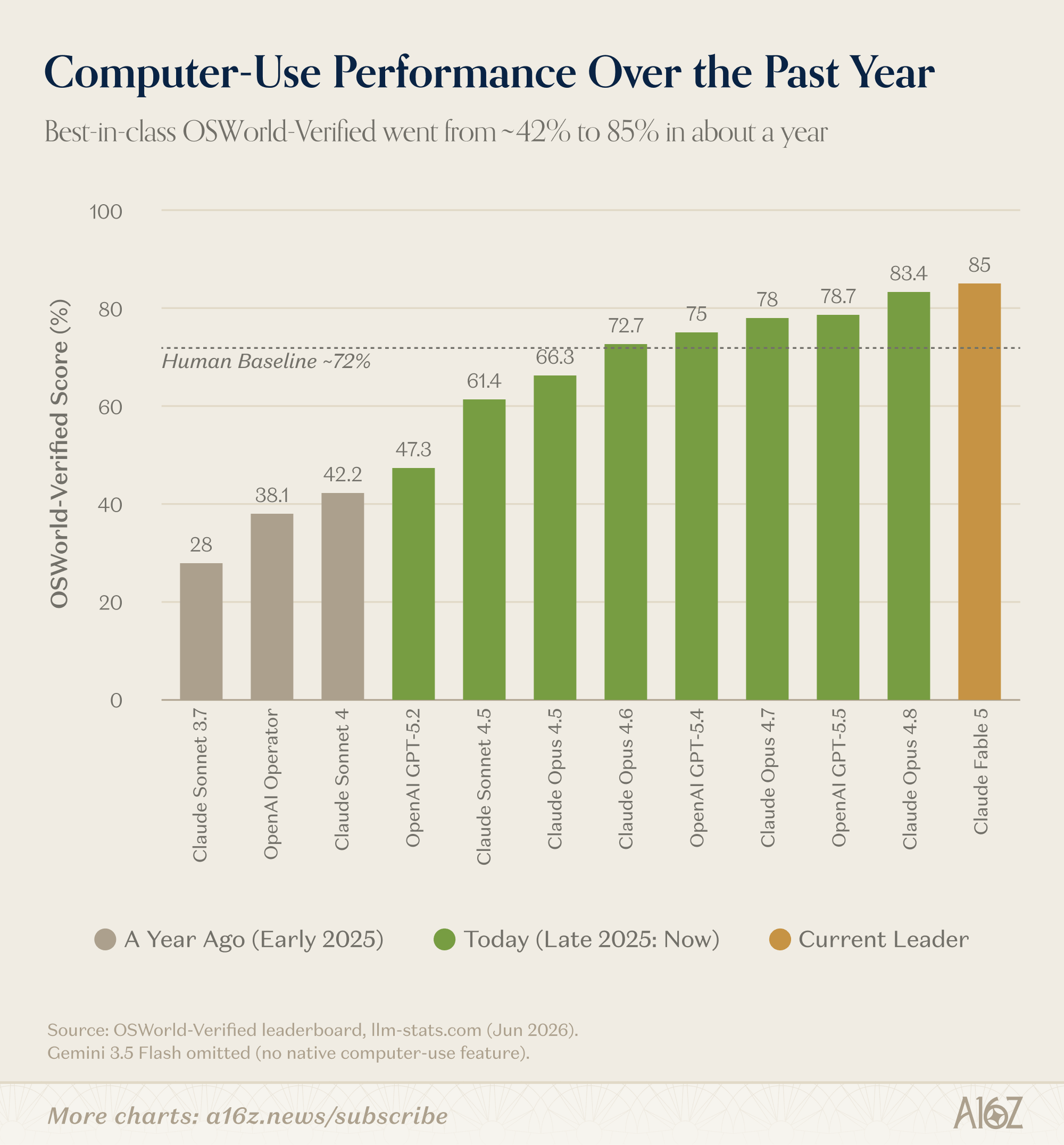
The benchmark chart tracks computer-use performance on OSWorld-Verified, the standard test of an agent operating a real desktop, scored as the share of tasks completed across Ubuntu, Windows, and macOS workflows. Each bar is the best reported score for that model, with the tan bars showing where the frontier sat a year ago (early 2025) and the green bars showing today; Claude Fable 5, the current leader at 85%, is highlighted in gold. The dashed line marks the ~72% that human testers score on the same tasks, so bars above it are at or beyond human level. All scores come from the llm-stats.com leaderboard (June 2026). Gemini 3.5 Flash is left off because it has no native computer-use feature, which makes its score an internal research eval rather than a true agentic run.
A year ago the best computer-using model scored 42% on OSWorld-Verified; today’s best scores 85%, above the ~72% humans manage on the same tasks (this means they successfully completed 85 of 100 tasks). In production these general frontier models run much like they do in the benchmark: the labs expose computer use as an API – the model gets a screenshot, returns clicks and keystrokes, with OpenAI’s CUA also layering in accessibility-tree or DOM data where available – and builders wrap that loop in their own harness: a sandboxed VM or browser, plus the orchestration, verification, and retry logic around it. Notably, almost nobody deploys consumer products (Claude, ChatGPT agent mode) for this – founders and enterprises build on the raw APIs, or buy from vendors who package them. And the capability jump is what made those setups viable – “the models weren’t good enough to use in production on their own until Opus 4.6 in February 2026,” as one founder building in the space put it. Somewhere in the last eighteen months, computer use capabilities crossed from demo to being deployable in the field.
Of course, benchmarks aren’t always the best proxy for the viability of a real-world deployment. OSWorld counts completed tasks, so 85% still means 15 of 100 failed, and a business process only finishes if every step does. Back-office work doesn’t grade on a curve: if a person reviews every output, no labor was saved. (It’s analogous to what’s happening in coding right now: the scarce resource is no longer writing the code, it’s vouching for it.)
We found that the best way to think about what matters is to go beyond the benchmark and focus on the core question: can a business process be reliably automated with computer-use capabilities? Under this lens, what makes the biggest difference is everything around the model – that is: verification, escalation, error handling when a retailer portal changes its layout overnight.
Perhaps the clearest tell is that one operator we spoke with, who runs millions of automated tasks a month, couldn’t tell us which model executes them; he hadn’t needed to find out. His vendor swaps models underneath him the way a cloud provider swaps hardware. But he did trust the computer-using agent to run these tasks. Bottom line: when your heaviest users stop checking the leaderboard, the leaderboard has stopped being the story.
Thus, the chart above explains why production deployments exist in 2026 and didn’t in 2024. From there on, what determines whether they work is everything else – and that’s the rest of this piece.
Agents are Protocol Following
We had various conversations with teams running workflows leveraging computer-use capabilities in production, and we learned from their experiences that protocol following tasks work best. Unsurprisingly, computer-using agents break on more complex workflows where accuracy is harder to verify. The overall takeaway is that computer-using agents are strongest on standardized, repeatable tasks with a clear, well-defined path. The real unlock is the long tail of software where no clean API exists and a person would otherwise be clicking through a UI by hand. In practice, the work looks like updating records in a CRM, QA, logging into government and insurance portals, pulling data off databases and regulatory pages, retail order processing, contract processing, or IT tickets in ServiceNow.
We believe the voice of the user here tells the story much better than any theory. Some examples: a CPG data platform walked us through how they run ~15-20M automated portal interactions a month, using agents as a self-healing fallback for hand-coded scrapers – when a retailer portal changes its UI, the agent diagnoses the break, fixes the automation, and keeps data flowing before an engineer ever sees the error. Once implemented, they told us, they cut the engineering team dedicated to scraper maintenance in half and re-allocated staff capacity to other workflows. In another case, from a global systems integrator, we learned they have 27 live workflows leveraging computer use agents that process ~1,500-2,100 IT tickets a day, with the ultimate goal of redeploying 20-25% of headcount on low-margin managed-services contracts. And finally an agency walked us through how they automated a recruiting workflow end-to-end to populate data in an applicant tracking platform as soon as a candidate interview was over. To do so they run a cheap non-frontier model because it “does everything we need and does it well.”
The clearest pattern is workflows where in theory a computer-use agent could operate and solve the task, but there is either no clear answer for “what good looks like” (i.e. they are hard to evaluate) or no reliable way of determining whether a task succeeded. Usually, issues arise fast when: (1) you can’t cross-check the output – think of an agent extracting payment terms from contracts into an ERP: if it reads “net 60” as “net 30,” the record looks perfectly plausible, passes every visual check, and nobody catches it until an invoice goes out wrong; and (2) in some cases there is no signal to verify success at the time the task runs – think of an agent submitting a claim on an insurance portal: the submission goes through, the screen says “received,” task done. Except two days later an adjuster calls the office because a policy number needs confirming before the claim can be processed. A human who filed that claim picks up the phone and sorts it out in thirty seconds; the agent has no idea the call ever happened, and the claim quietly stalls. Net-net is that a smarter model doesn’t fix a process whose ground truth shows up as a phone call to somebody’s desk a week later, unless the harness is designed to handle the edge case from the get-go.
Buyers Care About Infrastructure
For the buyers we spoke with, the model itself is rarely the deciding factor, as “the models today are already good enough.” In practice, they evaluate and pay for everything around the model: the infrastructure to run reliably at scale, pass security review, and prove ROI. Users don’t care whether the solution uses a given frontier model; rather they focus on whether it can actually get the task done at scale and reliably. Period.
As a consequence, failure modes matter more than any benchmark, and design for failure needs to be a first-class concern from the start because a solution that does not handle failures well will never be adopted in production. One example of what this looks like in practice and a pattern we ran into more than once: the agent runs the workflow once, the system caches it as deterministic code, runs execute as cheap repeatable code from then on, and the model comes back only when something breaks – to diagnose, fix, and re-cache. With this approach, cost per run falls over a workflow’s lifetime, and cheaper models just lower the bill. What’s interesting about it is how it handles uncertainty. Where before deterministic code simply failed, or a human had to review and fix every break, here the agent absorbs that uncertainty on its own. It’s one way of designing for failure, and it shows what buyers are actually rewarding and using at scale.
We did not encounter more sophisticated use cases among the users we spoke with, which tells us the market is still chipping away at the low-hanging fruit. That said, there is a long list of workflows that can be automated this way before anyone needs the harder tasks.
The Model Is Not the Differentiator, Context Is
For founders, the more important shift is what is becoming commoditized. Building a computer-using agent used to mean wrestling with Selenium or Playwright, or more recently Stagehand, and stitching together DOM or video recordings to capture a workflow. That whole execution layer is getting abstracted away, the same way Claude Code abstracted the scaffolding around coding agents. If clicking the right button is no longer the hard part, it is no longer the moat.
Unsurprisingly, the context and knowledge of the workflow are durable. The hard part is not whether an agent can navigate an SAP screen, it is whether it understands how a particular company actually gets work done: the tribal knowledge, the internal terminology, the preferred formats, who to escalate to and when, how to handle failures, how to verify output reliably. In practice that context lives in runbooks, in access and credentials, in test cases and guardrails for when a workflow goes off-script, and increasingly in a single recorded video of someone doing the job once. None of it is general. All of it is specific to a company, and often to one team. That said, it is exactly the kind of specific, unglamorous problem that focused startups tend to solve better than model providers, which is why we think the next generation of agentic coworkers gets built at the application and context layer, not the model layer.
The buyers we spoke with squarely confirmed this. They picked vendors on whether the product reported hours saved without extra work, and whether a junior engineer could run it. For now, the moat is not the frontier capability—rather, it’s being the vendor an enterprise is allowed, and able, to use at scale in production.
The Real Inflection is Economic, Not Just Technical
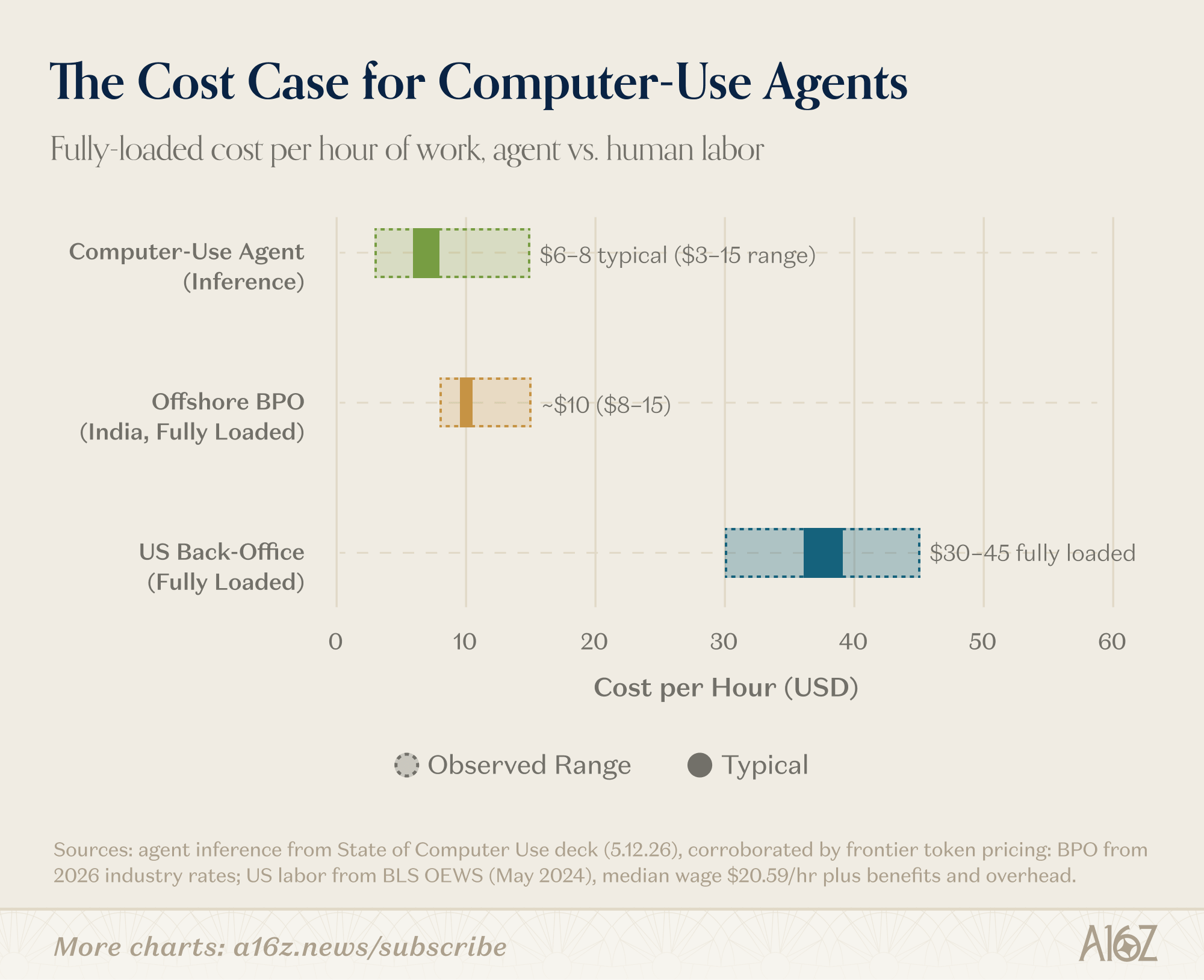
The cost data is also encouraging. Take the numbers above as an order of magnitude, not a precise quote. Running an agent costs roughly $6-8 per hour of inference today, but in practice anywhere between $3 and $15 depending on how the harness is built – how often it screenshots, how much context it carries, how much of the work it can hand off to deterministic code. These figures describe the agent operating the UI screenshot by screenshot with a frontier model – the most expensive mode there is. Well-built harnesses reserve that mode for what actually needs it, and let cheap deterministic code handle the repeatable parts – not every workflow can be optimized this way, but where it can, blended cost drops fast. So read the comparison as the worst case, and even then an agent is roughly break-even against offshore BPO at ~$10/hour fully loaded, and pencils out to a 70-80% gross margin against US back-office labor at ~$30-45/hour. In production, the harness drives real-world cost as much as the model does.
Same caveat on speed. In agentic mode, agents are still slower than people, and it is not close – a task someone finishes in two to three minutes can take an agent eight to ten, and academic benchmarks put the gap even wider. Deterministic runs flip this: code executes faster than any human – but for the agentic work the argument is not speed. It is that an agent runs around the clock, costs a fraction of US labor, and scales without hiring.
This comparison works for BPO buyers and ops teams, but the unit economics look different if you are the one selling agent-hours, because costs are less predictable in the wild. COGS are inference plus retries (i.e. failed runs still burn tokens) and margins compress when context grows or screenshot frequency goes up. Vendors manage this by pricing per task, per hour, or per outcome, each with a different risk profile depending on workflow variance. There are also the practical realities of things like monitoring, maintenance and human escalation, which are being priced in, just as they would be with human workforce. There is no one-size-fits-all business model here yet, and the answer varies by vertical.
And the math only gets better – inference keeps getting cheaper, and open-source models are getting good enough for a growing share of these workflows. For any task an agent can reliably solve, embedding computer-use will likely be way more convenient than human labor. So the real question is no longer whether the economics work – it’s how far the set of tasks that can be solved reliably extends, which is where things are heading next.
Where Do We Go From Here?
Over the past year, labs and a wave of startups have poured hundreds of millions into computer-use RL environments – the sandboxes where a model practices real tasks and gets rewarded for finishing them – with companies like Mechanize, Habitat, Fleet, Chakra, Deeptune, Matrices, and Originator building the training and eval substrate underneath the frontier models. That spend is what shows up as better reasoning, better state tracking, and more tolerance for apps that misbehave. The models still need careful harnessing to hold up in production – run-caching being the clearest example – but the raw capability was bought, deliberately, through this training infrastructure and will only get better over time.
Architecture, though, is a different story. Most computer-use systems deployed in production today are single-agent: one model, one task, one session. As workflows get more complex and latency becomes a constraint, multi-agent architectures start to matter. For example, a planner decomposes the workflow, executor agents handle subtasks in parallel and long-running agents bring their own problems: memory, trust, and failure rates that compound over time. The teams doing interesting work here are all building bespoke orchestration, because no standard framework exists yet. The Claude Code analogy is instructive: when coding agents matured, a scaffolding layer emerged to abstract the orchestration away. The same is likely to happen for workflows leveraging computer-use capabilities, and that abstraction layer is one of the more interesting unsolved infrastructure problems in the space.
From here, future developments run along three lines: accuracy, latency, and cost. Accuracy is most important, and, as we explained above, represents the difference between a cool demo and actually solving the problem – catching anomalies, checking its own work, escalating only when it actually needs to. Latency is the one most likely to surprise people: some teams already cut it today by grounding on the accessibility tree instead of screenshots. Standard Intelligence’s general computer action model is trained on an 11-million-hour video dataset, running at 30 FPS, and is an early signal that the step-by-step screenshot loop slowing today’s agents is a solvable problem, not a permanent tax. Cost keeps falling as inference gets cheaper, and smaller non-frontier models take over the routine clicks. These three vectors in addition to security and governance (e.g. credentials, audit logs, data retention, prompt injection, and accountability, permissioning).
Enterprises can and are benefiting from computer-using agents for narrow workflows that have high volume, repetitive steps, stable business rules with legacy interfaces or missing APIs. For now, they are best suited for tasks with immediate, machine-observable evidence of success, tolerable failure consequences, and clear escalation routes. But with the above developments, improvements are real and rapid, making computer-using agents more viable for more types of work.
Let’s just say – the future for computer-use capabilities is bright!

Fabrizio Serafini
is an investment partner at Andreessen Horowitz where he focuses on AI application investments.

- You Need a New CFO Seema Amble, Ivan Makarov, and David Borecky
- Why AI Agents Can Beat the Incumbents Vladimir Keil, Seema Amble, and Elena Burger
- The Incumbents Are Coming Seema Amble
- Is Software Losing Its Head? Seema Amble, Elena Burger, and Steven Sinofsky
- Investing in Probook Alex Rampell, David Haber, Olivia Moore, and Seema Amble

- Investing in Tessera Labs Seema Amble, Eric Zhou, and Joe Schmidt
- Why the World Still Runs on SAP Eric Zhou and Seema Amble
- Investing in Lio Seema Amble, James da Costa, Eric Zhou, and Brian Roberts
- The Rise of Computer Use and Agentic Coworkers Eric Zhou, Yoko Li, Seema Amble, and Jennifer Li
- Investing in Cluely Bryan Kim and Eric Zhou